RuneScape · plugin · Interface
Name Highlight
Your name, and any nicknames you add, light up in chat when someone says them.
In the game
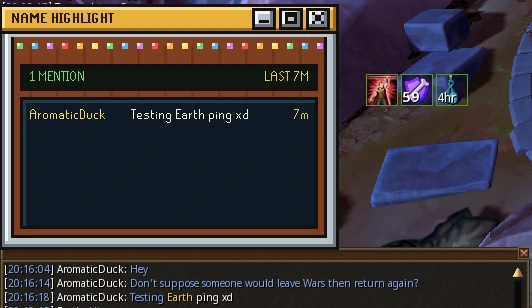
What it does
- Allow Chat Access. The plugin can't see chat without it.
- Click [] for the bigger window. Type a nickname and click ADD. Click a colour square to change its colour, or type a colour code after the name, like Rabbit #ff66cc.
- When someone says one of them, the chat box glows in that colour and the window lists who said it and where. A sound plays if you're tabbed out.
- The window drags by its title bar: - shrinks it, [] makes it bigger, X closes it. The settings cog brings it back.
Install
- Unzip it into C:\ProgramData\Jagex\RuneScape-BETA\dev_plugins
- In game, open the console. It takes one command per Enter, so type these one at a time:
prfpon name-highlight- ppr name-highlight
ppe name-highlight chatAccessprfprl name-highlight
Unofficial, not affiliated with Jagex. RuneScape is a trademark of Jagex Ltd.